远程办公:用 AI 会议纪要省下每天 2 小时
开完会最累的不是开会,是整理。Otter 这类工具实时出文字稿+摘要,让你专注听而不是狂记。The tiring part isn't the meeting — it's the cleanup. Live transcripts and summaries let you listen, not scribble.
痛点The pain
- 边听边记漏重点、跟不上
- 会后整理半小时起步
- 行动项丢失谁该做啥说不清
工具与流程Tools & flow
- Otter.ai入会实时转录、分发言人
- 会后 AI 摘要自动给要点+待办
- 同步文档粘进 Notion/飞书
实操步骤Steps
会议开始前打开 Otter 并接入会议;结束即生成文字稿与摘要;把“行动项”复制到团队文档并 @负责人。Start Otter before the call; get transcript + summary after; paste action items into your doc and @ the owner.
隐私注意Privacy
- 敏感会关自动上传或本地转写
- 客户数据看清厂商数据处理条款
- 合规按公司政策留存
小结Wrap-up
把“记录”交给 AI,把“思考”留给自己,会议效率与执行清晰度都会提升。Offload recording to AI, keep thinking for yourself — both efficiency and follow-through improve.
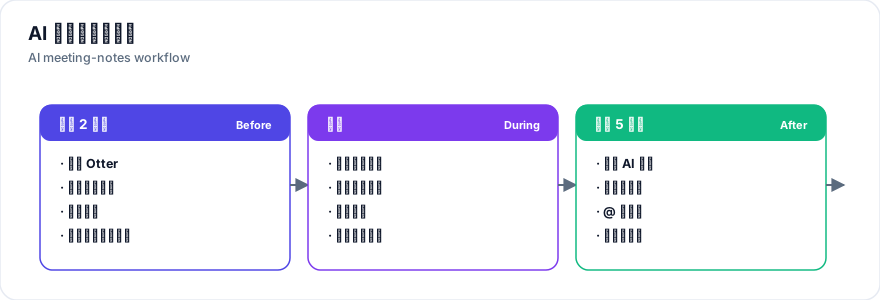
完整操作流程The full workflow
会前 2 分钟2 min before
打开 Otter 并确认已接入会议软件(Zoom/Teams/Meet),测一下麦克风。提前建好笔记模板,约定谁来跟进行动项。Open Otter, confirm the meeting integration, test your mic, and set a template with a named action-item owner.
会中During
让它全程转录,你专心听和讨论。偶尔扫一眼实时字幕确认没有大面积识别错误即可,不必全程盯着。Let it transcribe; focus on the discussion. Glance at live captions occasionally to catch drift.
会后 5 分钟5 min after
生成摘要后,只做一件事:把「行动项」复制到团队文档(Notion/飞书)并 @负责人。文字稿留作存档,需要时再检索。Copy the action items into your team doc and @ the owners. Keep the transcript as an archive.
不同角色怎么用By role
- 项目负责人Project leads:用行动项跟踪进度与责任。
- 记者/研究员Interviewers:用可检索的文字稿快速找原话。
- 学生Students:课后回看要点,不必重听整节课。
团队落地建议Rolling out for a team
- 统一模板Standardize templates:全组用同一套笔记结构,便于横向检索。
- 只记行动项Track actions only:让 AI 负责记录,人只负责决策。
- 工具不叠加Avoid tool sprawl:一个转录 + 一个文档工具足够,贪多反而乱。
真实案例:远程团队每周省下 2 小时Real case: 2 hours saved per week
一个 6 人远程团队此前每周开 2 次 60 分钟评审会,会后整理纪要平均耗时 35 分钟/次(每人每周约 70 分钟)。接入 Otter 流程后,整理时间降到 约 5 分钟(只复制行动项并 @人),每周团队节省约 2 小时。A 6-person remote team held two 60-min reviews weekly and spent ~35 min per meeting on notes (≈70 min/person/week). With Otter, wrap-up dropped to ~5 minutes (copy action items and tag owners), saving the team ~2 hours a week.
- 落地要点Rollout tip:只让一个人负责「会后 5 分钟」的动作,否则容易变成没人做。
- 边界Boundary:涉及客户机密的会议仍建议关自动上传,用本地转写替代。